Voice with your employee
Voice lets you talk to the employee you already work with in CruzClaw. Choose the employee, start a call and hear its answer through your computer’s speakers.
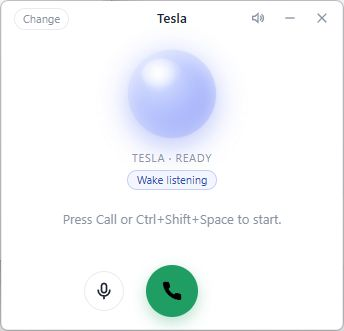
The Windows voice panel, captured 2 November 2026. Wake listening is optional and is enabled in this example.
Start a call
Section titled “Start a call”- Install the Windows app and sign in.
- If Voice is enabled, open the voice panel. Use Show voice window in the tray menu if it is hidden.
- Choose the employee under Voice employee in the tray menu. Check the selected name before you speak.
- Use the panel’s speaker test to check that you can hear playback.
- Select Call Cruz from the tray menu or use the shortcut shown beside it.
The default shortcut is Ctrl+Shift+Space, with Ctrl+Alt+Space used if the first is unavailable. The tray menu is the reliable place to check the active shortcut.
The panel shows the conversation and call state. You can mute the microphone or hang up. If a call cannot start or audio cannot play, check the displayed reason rather than assuming your employee heard the request.
Optional wake phrase
Section titled “Optional wake phrase”Choose Listen for “Hey Cruz” from the tray menu and review the consent notice to enable wake listening. It is optional and remains off until you opt in. Turn the same setting off when you no longer want it listening for the phrase.
The wake phrase can interrupt an answer. A sign-off ends the exchange; Hang up is also available in the tray.
The same employee, with the same boundaries
Section titled “The same employee, with the same boundaries”Calls use the selected employee’s existing gateway. Voice does not create a separate employee or bypass the account’s permissions and send rules.
Read Approvals and spoken follow-ups before relying on a spoken request for an external action. For connection or audio problems, see Voice troubleshooting.
Reviewed against the current product source on 2 November 2026. Voice remains early access; availability and acceptance vary by feature.