Set up your team
Begin with the work you need covered: who coordinates it, which specialists contribute, and what each employee should own. Arrange TEAM access before adding employees beyond your current plan’s allowance.
Set roles and responsibilities
Section titled “Set roles and responsibilities”Open the employee directory (Persona in the sidebar) to create or review employees. Give each a role and instructions that describe its responsibilities, the expected outputs and when it should ask you for help. Connect only the tools it needs.
In Organization, the Role ownership map summarizes what employees own. Edit ownership areas on the employee profile to make those responsibilities explicit.
Designate the leader
Section titled “Designate the leader”In the Organization map, use the employee’s crown control, labeled Set [name] as team leader, to choose who should coordinate the team. The leader must be active. The Leader badge identifies the employee that receives orchestrated work and speaks for the team.
The Executive Assistant supports you directly and cannot be the team leader.
Set reporting lines
Section titled “Set reporting lines”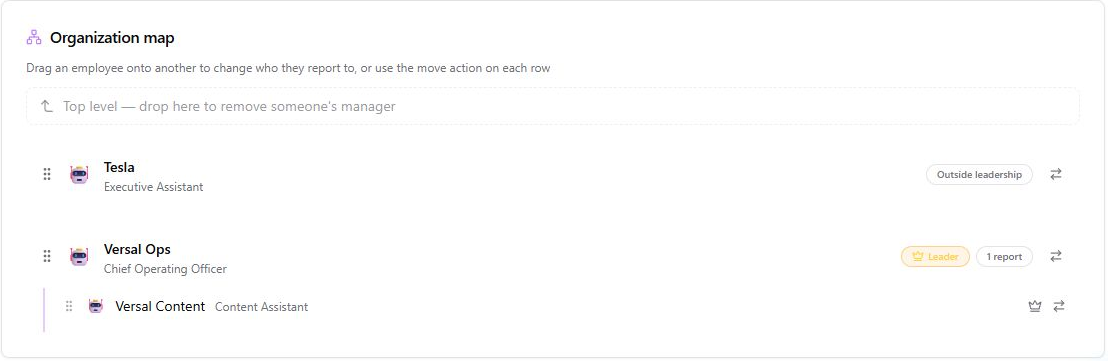
An actual TEAM organization map, captured 2 November 2026.
Drag an employee onto another in the Organization map to change who it reports to, or use the row’s move action. Review the resulting structure after saving. Reporting lines describe coordination; they do not replace each employee’s tool permissions.
Give the first objective
Section titled “Give the first objective”Start a chat with the leader and describe a bounded task, the desired output and any deadline. For example:
Prepare a draft launch brief. Ask the content specialist for messaging and the operations specialist for dependencies. Bring me the combined draft before anything is published.
This is an example instruction, not a promise that a task has run. Follow the actual work in Notebook and review any questions or approval requests.
Next: Delegation and reports.